

Do you need a moderation bot for your Discord server?
You need MEE6.
The versatile application tops the list of must-have Discord bots. It’s bursting with functionality, offering tons of customization options for your Discord moderation needs.
However, integrating MEE6 into your server to set up all the cool features may seem overwhelming to novice Discord users.
We can help. Here, we highlight MEE6’s best feature (for both free and premium) and provide basic instructions for getting it up and running.
What Does MEE6 Do?
MEE6 is, at its heart, a moderation bot. It can help reduce spam in your Discord community, prohibit inappropriate language, and give server owners easy access to a plethora of commands.
But it offers far more. The robust functionality makes MEE6 a must-have bot for any Discord server. It can produce automatic welcomes, increase engagement by allowing server members to “level up”, and let you record video chats.
Functionality varies based on whether you stick with the free version or upgrade to MEE6 Premium.
MEE6 Free vs. Mee6 Premium
The premium version of MEE6 offers far more than the free version. Upgrading to the premium version unlocks more reaction roles and allows you to integrate MEE6 with other social accounts.
If you want one bot to do everything on your server, upgrading to premium is well worth the money.
It’s also nice to upgrade to support the bot creators. A lifetime premium plan only costs $90 (and they have deals all the time!). If you’re not sure you want to commit, you can pay by the month or by the year. It’s $5.99 per month, or $24.99 if you pay the full year in advance.
Keep in mind, each subscription is only good for one server, so if you own multiple servers, you will need to purchase MEE6 separately for each one. However, it is transferable, so if you build a server, shut it down, then start a new one, you don’t have to buy it again.
Here’s a complete comparison of what MEE6 premium offers in comparison to the free version, sourced directly from the MEE6 website:


| Feature | Free | Premium |
| Server Management | ||
| Automations | No | 50 |
| Custom Commands | No | 500 |
| Moderation | No | Yes |
| Reaction Role | No | Yes |
| Maximum embeds on a ticketing panel message | 0 | 10 |
| Maximum embeds on a ticket introduction message | 0 | 10 |
| Enable transcripts of deleted tickets | No | Yes |
| Welcome & Goodbye Messages | No | Yes |
| Invite Tracker | No | Yes |
| Utilities | ||
| Polls | No | Yes |
| Embed Messages | No | 500 |
| recording | 2 minutes | Yes |
| Search anything command | Yes | Yes |
| Basic channel stats counters | No | Yes |
| Social channel stats counter | No | Yes |
| Temporary Channels | No | 100 |
| Timed messages | 1 | 100 |
| Social Alerts | ||
| Subreddits | No | Yes |
| Twitch accounts | No | Yes |
| Twitter accounts | No | Yes |
| YouTube channels | No | Yes |
| RSS Feeds | No | Yes |
| Instagram accounts | No | Yes |
| Engagement & Fun | ||
| Birthday messages | No | Yes |
| Economy plugin | No | Yes |
| Number of items in economy store | none | 100 |
| giveaways plugin | no | Yes |
| XP and Levels | No | Yes |
| Music Quiz | No | Unlimited |
| Bot Personalizer | No | Yes |
| Custom Prefix | No | Yes |
| Leaderboard vanity URL | No | Yes |
| Leaderboard join button | No | Yes |
The chart is a little misleading. It makes it seem like the free version offers nothing, but when you start building your server, you’ll see that’s not true.
The free version offers basic functionality. You can create a welcome message, add a reaction role (though you’re limited to two roles), give new members roles, designate a welcome channel, add custom emojis, search for anything, and add custom reminders.
The premium version offers so much more, including integrations with other sites (Twitch, Twitter, YouTube, Instagram, etc.), XP levels, achievements, and automations.
Alternatives to MEE6
MEE6 is the best all-in-one moderation bot for Discord, if you’re willing to pay for premium. However, if you need specific functionality and can’t afford to pay, consider these alternatives:
- Yet Another General Purpose Discord Bot (YAGPDB)
- Carl-Bot
YAGPDB
YAGPDB offers free Twitch, Reddit, and YouTube integration. The bot allows you to set up a “now live” channel to showcase streamers currently live on Twitch, an excellent option for Discord servers dedicated to streaming.
It also offers a suite of free moderation tools, including time-outs, bans, warnings, and read-only roles.
Carl-Bot
If you are running a server with a lot of user-selected roles, you need Carl-Bot, which allows you to add far more emoji reaction roles in its free version than MEE6.
The free version offers 250 reaction roles and a wide range of auto-mod functions.
How Do I Add MEE6 to My Server?
Adding MEE6 to your server is simple and straightforward.
Go to the MEE6 website and click the “add to Discord” button.
A pop-up will appear asking you to sign in to your Discord account. Once you’re signed in, the servers you own/administer will appear. Select the server you want to customize. The website automatically takes you to the customization screens, where you can set up your MEE6 commands.

Only those who own a server or have administration rights to a server can add MEE6 or adjust the bot’s permissions and settings.
Getting Started with MEE6
Once the bot is added to your server, you can access the MEE6 Dashboard, an online platform for customizing its settings.
Here, you will find a list of the available plugins and a link to the MEE6 support Discord if you need assistance.
MEE6 Plugins
Plugins are what make the MEE6 bot work for you. There are a variety of plugins available, and you probably don’t need them all.
You can easily turn any plugin on or off by clicking the blue “enable” button. Once the plugin is activated, you can click on its name to configure it.
Here’s a brief overview of the most popular plugins and how they can help you manage and customize the perfect Discord server.
Server Management
The server management suite of plugins offers tools designed to help you manage your server.
These plugins include a welcome message, reaction roles, the ability to add custom commands, and moderation tools.
Utilities
The utility plugins allow you to add more functionality to your Discord server.
These tools enable you to embed messages, set timers, record conversations, and track statistics both within Discord and from social media.
Social Connections
Speaking of social media, the premium version of MEE6 offers a suite of social media integrations.
MEE6 integrates with Twitch, Twitter, Instagram, YouTube, and Reddit. You can set the bot up to automatically post tweets from your favorite Twitter accounts, showcase when your favorite streamers go live, and post your favorite YouTubers’ latest videos.
Engagement/Fun
Everything is not about utility. A critical aspect of managing a Discord server is making it a fun place where users will want to hang out and engage.
MEE6 offers a few engagement plugins to help make your server friendly and welcoming.
You can add “levels” to celebrate the most active users, a happy birthday channel, and even in-server currency!

MEE6 used to have a music feature, but it morphed into a music quiz with the crackdowns on music-only bots by Google.
Although you can no longer stream music from YouTube, you can play the “Guess This Tune” game, adding an extra engagement element to the server.
Monetization
MEE6 also offers server owners the ability to monetize their servers with premium membership roles. Your biggest fans can pay a monthly fee to enjoy secret channels or other perks.
Premium plans allow users to access extra content or exclusive roles on a subscription model. The MEE6 bot allows you to create multiple plans, so you can offer multiple subscription tiers for different payment options.
Using MEE6 Bot Commands
With so much functionality packed into this bot, it can be hard to remember what everything does and how to use it.
Like most bots, MEE6 offers users the ability to find information with text commands.
The “commands list” can help.
To use the commands, users must type the command prefix (which defaults to an exclamation point, but server owners can change that if they want) and the command. For example, if a user wanted to know their rank in Discord, they could type !rank, and the bot will send a message that shows their rank.
Server owners can also set up custom commands, which add an additional layer of functionality to the server. For example, if a server owner wanted to create a custom welcome message that everyone could access, they could add it to the commands list and use the command !welcome. When anyone in the server types “!welcome” the custom message pops up.
To see a full list of MEE6 bot commands available in any server, type !help. This command will cause the bot to display a message featuring the available commands.
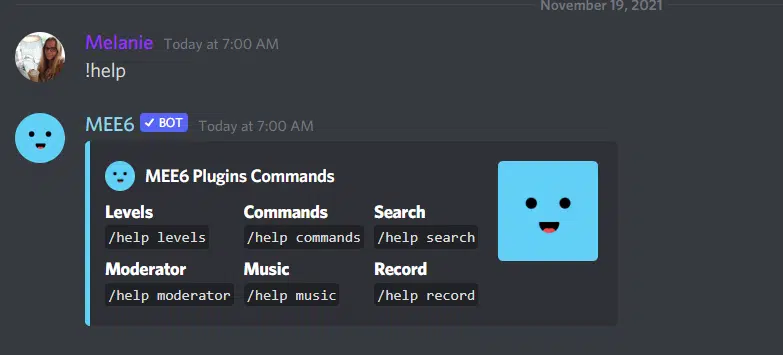
Note: None of the commands need to be italicized in Discord, and they do not need periods at the end.
Make an Epic Server with MEE6!
MEE6 is an incredibly versatile bot, so it’s often regarded as one of the best bots for Discord. It’s an all-in-one moderation, engagement, and server management bot to help Discord server owners make the perfect server.