
Discord provides free messaging and group interaction for nearly everyone’s interests. Although it originally started as a place for gamers to gather and communicate for online play, it quickly morphed into the go-to messaging system for thousands of people.
Users can find servers dedicated to nearly any topic they desire, from personal finance to gaming, anime to life coaching.
Although Discord offers its basic functionality to everyone for free, the platform also features a premium service bursting with perks and bonuses: Discord Nitro.
What is Discord Nitro
Discord Nitro is Discord’s premium service and one of the top ways the popular messaging app makes money. Users can upgrade to Discord Nitro to receive perks, bonuses, and extra features that aren’t available to free users.
I love the way Discord differentiates its premium service from its free service. Most companies limit basic functionality, basically forcing users to upgrade to even use their products.
Not Discord. Every user can access the basic functionality for free. Nobody has to pay.
Instead, Discord Nitro offers bonuses, making the platform more fun and engaging. Users who want fun features, cool functions, and more of the swag they’ve come to love from Discord can pay a nominal monthly fee to get it.
What Does Discord Nitro Get You?
Discord Nitro lets users customize their experience with flair, add-ons, and fun bonuses. The app offers two plans: Nitro Basic and Nitro Premium.
The move to a tiered subscription service provides users with more flexibility, allowing those on a tight budget to enjoy some of the perks.
The extra features you get with Discord Nitro depend on your chosen plan.
Nitro Basic

Nitro Basic offers users one of Discord Nitro’s top perks for a lower cost: emojis everywhere.
Everyone loves Discord emojis, but some people didn’t want to pay a full $10 a month just to get access to universal emoji use. The lower price point made it far more attractive for users.
Here’s what you get with Nitro Basic:
- 50mb uploads
- Custom Emoji Anywhere
- Unlimited Super Reactions
- Special Nitro Badge on Your Profile
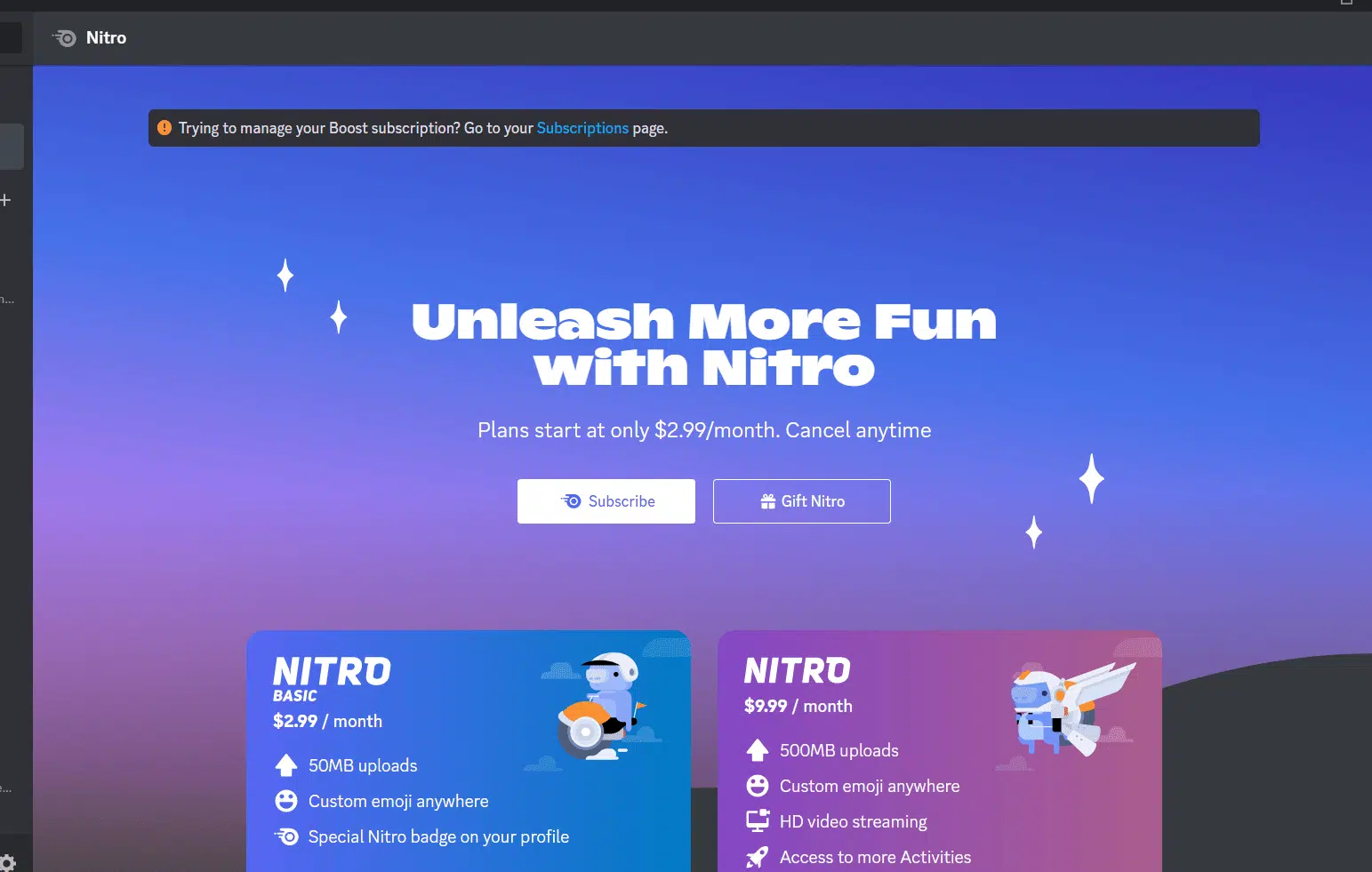
For the low cost of just $2.99 per month (or $29.99 a year for annual subscribers), you can use your favorite emojis in all the servers you join.
It’s a great option for small business owners (like Twitch streamers or YouTubers) who want to spread their branded emotes around Discord, and fans obsessed with their favorite emojis.
Discord Nitro
When adding the basic plan, Discord didn’t change its original premium offering: Nitro. Nitro is the original plan, which still costs $9.99 a month but offers far more than Nitro Basic.
Here’s what you get with a Discord Nitro Subscription:
- 500mb uploads
- Custom emoji anywhere
- Custom stickers + Nitro exclusives
- HD video streaming
- 2 server boosts + 30% off additional boosts
- Custom profiles
- Access to more activities
- Animated avatar, profile, and custom tag
- Custom server profiles
- Custom video backgrounds
- Join up to 200 servers
- Longer messages up to 4,000 characters
Power users may love the ability to send longer messages (free users are limited to 2000 characters), stream in HD, and join more Discord communities.
Server owners might want it for the custom server profiles and free boosts (rather than paying separately to boost their server).
In 2026, Discord added an extra perk to its premium Nitro plan: Xbox Game Pass! (In select regions).
Nitro Classic
With the arrival of Nitro Basic, Discord retired its Nitro Classic plan. However, users who were on the plan and wanted to keep it were grandfathered in.
How Much Does Discord Nitro Cost?
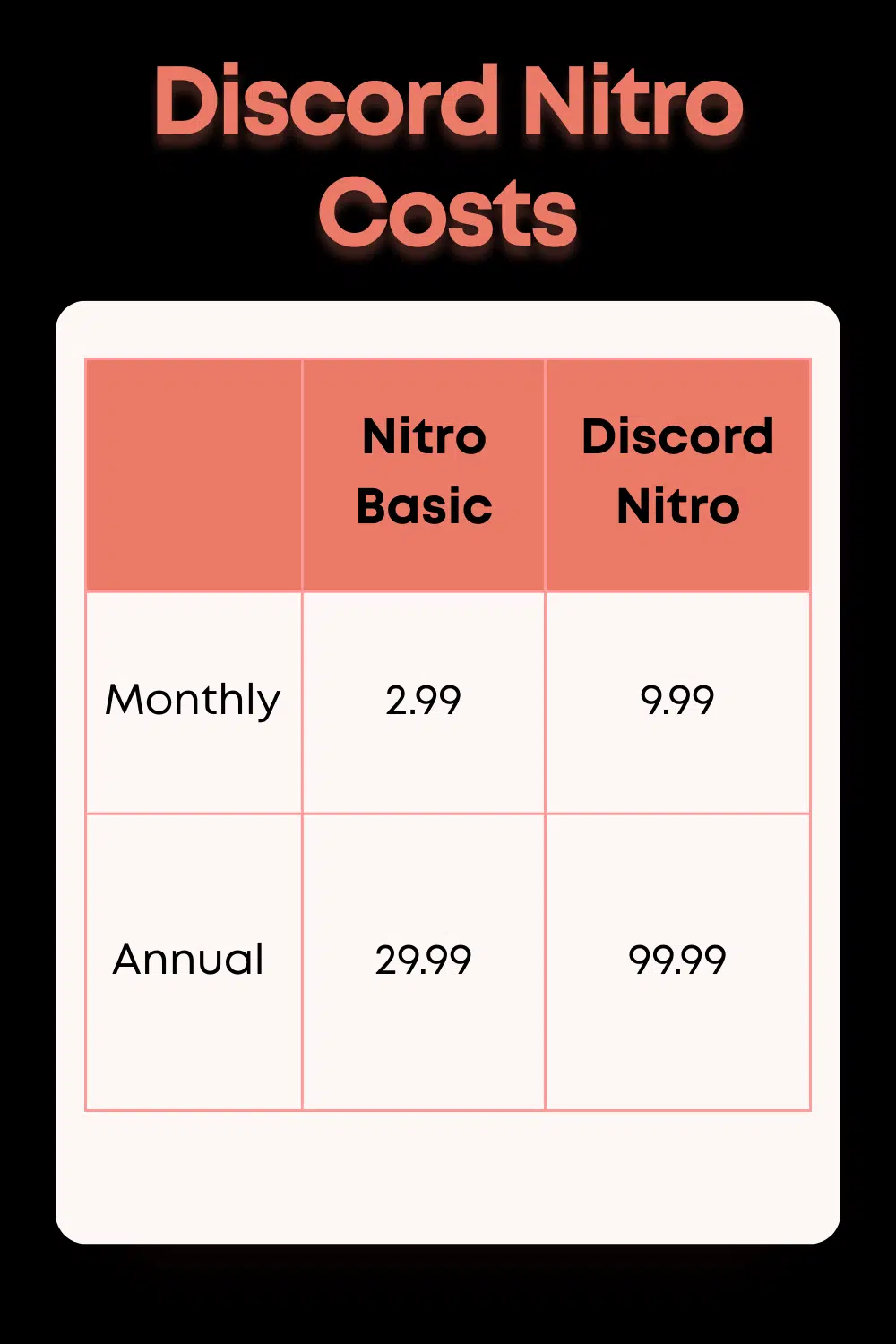
Discord Nitro’s cost varies based on your chosen plan, and whether you pay monthly vs. yearly:
Discord Nitro Basic Cost
Nitro Basic costs $2.99 per month or $29.99 per year. Subscribers opting to pay yearly will save $5.89 on their subscription each year.
Discord Nitro Cost
A full Discord Nitro subscription costs $9.99 per month or $99.99 per year. Users who pay for the entire year will save $19.89 on their Discord Nitro subscription.
Why Did Discord Change Its Nitro Offerings?
According to the October press release, Discord changed its Nitro offerings to “better serve the needs of our growing user base.” The new plan offers a selection of users’ favorite Nitro features at a fraction of the cost.
We suspect this change will tempt more users to purchase a premium subscription, as the ability to use custom emotes everywhere is extremely popular. The lower price to access this feature may be attractive to many users.
Can You Get Discord Nitro For Free?
Discord users are bombarded with messages luring them with fake offers of free Discord Nitro. More often than not, the message came from a nefarious bot attempting to scam users or access their private information.
Never trust a random message claiming you can get Discord Nitro for free.
You can, however, gift Discord Nitro subscriptions to users. If you receive Discord Nitro for free as a gift, ensure you verify it’s legitimate and only accept it from trusted sources.
The best way to access all the great features Discord Nitro offers is to pay for it. The messaging app offers a wide range of free functionality for all users. The small fee for Nitro’s fun perks and extras is more than worthwhile, especially for frequent users. It helps support the platform, ensuring everyone can keep talking with their friends around the world.
Bot Integration instead of Discord Nitro

Some bots and third-party platforms offer functionality comparable to Discord Nitro, but we don’t recommend using them. If you want the services provided by Discord Nitro, you should pay for them.
You should integrate Discord bots into your server if you want to add additional functionality not offered by Discord, such as games, extra moderation, tracking, and more.
Read Next: Why MEE6 is the Best Moderation Bot for Discord
Is Discord Nitro Worth the Cost?
If you love Discord, the paid premium offering is worthwhile. Most users will get everything they want with the basic subscription, which is so cheap that it’s almost silly not to buy it. It’s also a great way to support one of the best messaging apps on the internet.
Discord Nitro’s full plan is a little pricier but worthwhile for those who own servers and spend a lot of time on Discord.
How To Get Discord Nitro
Are you ready to dive in and explore what Discord Nitro offers?
You can purchase Discord Nitro either through the website or through the App.
Subscribing Via the Website
Head to the Discord Nitro page and hit the “subscribe” button for the Nitro offering that best meets your needs. If you have the app, a message will pop up asking whether you want to continue in the app, but you can opt to use the browser.
Once you log in, you’ll be taken to a page where you can manage, purchase, or gift your subscriptions. When you hit subscribe on either plan, you’ll be given a final opportunity to select your subscription tier before the payment screen pops up.
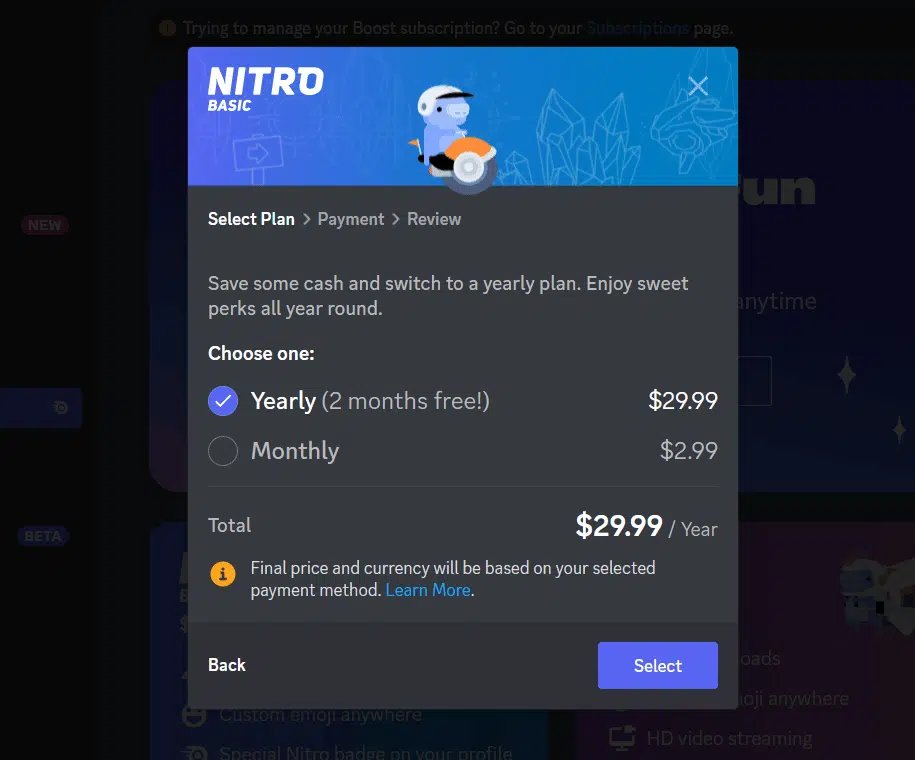
You can select whether you want a monthly or yearly subscription on the payment screen. Once you decide, hit “select” to complete your transaction.
Subscribing Via the App
While in the app, select the Discord icon in the far upper left-hand corner of your screen. It will be above all your servers. Your direct messages or friends list will typically appear on the main screen first.
When you look to the left, you will find a column listing all your previous conversations. Above that, you will see two options. One says “friends,” and below that, you will see “Nitro.”
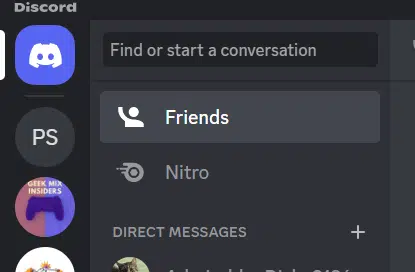
Selecting Nitro will take you to the in-app Discord Nitro page, where you can manage your subscriptions or make additional purchases. Select the nitro options you want, and follow the prompts to continue to payment.
Alternatively, you can select the gear in the far lower-right-hand corner of your Discord app screen to visit the “user settings” page, where you will find a list of options. You will find “Nitro” and “Subscriptions” under your billing settings.
Canceling Discord Nitro
To cancel a subscription, you need to navigate back to the Discord Nitro page, either in the app or on the website. Once there, you will see a banner at the top, offering a link to the “subscriptions page” where you can manage your subscriptions.
Discord Nitro is a Great Option

DVKi via Shutterstock.com.
Discord Nitro is everything we want to see in a premium subscription offering. It offers users cool perks and bonuses but doesn’t gatekeep the app’s core functionality.
It’s an excellent product for those who want to show swag on Discord and those who wish to support the popular messaging app.